
Feature
Pick the AI model that fits each job
MatesBot teammates can use models from Anthropic (Claude), OpenAI (GPT), Google (Gemini), xAI (Grok), and many others. Each teammate can use a different model for chat, voice calls, images, and video, and you pay either from plan credits or with your own provider keys.
Sign up with your work email.
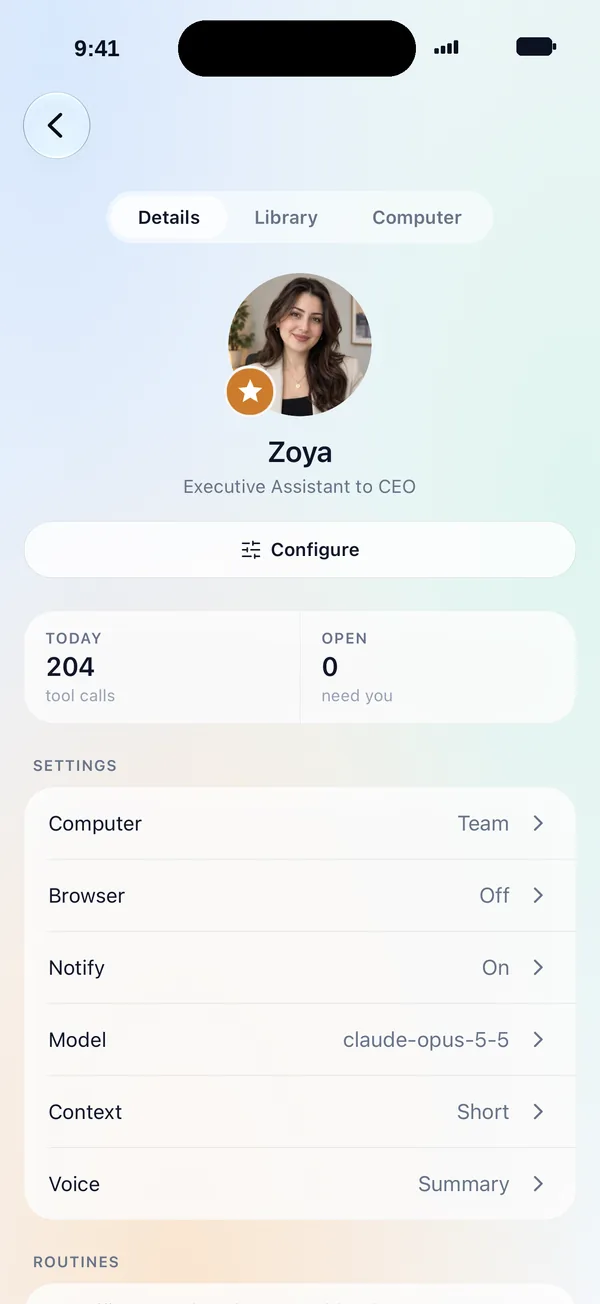
Different jobs suit different models. A writing teammate might use one model, a research teammate another, and an image model makes campaign pictures. You set this per teammate, along with the thinking level (from Off to Max) and the context length.
There are two ways to pay. On a credits plan there are no AI accounts to set up: pick a model and usage is charged at the provider's cost plus a markup, from monthly credits. On the Bring your own models plan you connect your own provider keys or subscriptions.
Admins can choose which models members may use, and set a weekly spend limit per member.
Last updated:
How it works
- 1
Open the teammate's settings
Choose the chat model, voice-call model, image model, and video model.
- 2
Set thinking and context
Pick a thinking level from Off to Max and a context length for the work.
- 3
Choose how to pay
Use plan credits with no setup, or connect your own keys on the Bring your own models plan.
- 4
Watch usage
The usage meter shows what each teammate spends.
Example tasks
- A Sales teammate on a strong writing model for outreach drafts.
- A Research teammate with a long context length for big reports.
- A Social media teammate with an image model for post pictures.
- A finance team on your company's own provider keys.
What stays in your control
- Admins choose which models members may use.
- Weekly spend limits per member.
- Top-up credits never expire. Monthly plan credits reset each period. Auto top-up is optional.
Related features
- Approvals and securityApproval rules, an AI reviewer, encrypted secrets the model never sees, spaces, roles, and spend limits.Learn more →

- Its own computerA browser, terminal, and files for every teammate. Watch it work and take control anytime.Learn more →
- Website teammateConnects GitHub and your host, then maintains your site with daily SEO and GEO work. It runs this site.Learn more →
Frequently asked questions
Which AI models does MatesBot use?
Models from Anthropic (Claude), OpenAI (GPT), Google (Gemini), xAI (Grok), and many others. You pick per teammate.
Can I use my own AI keys?
Yes, on the Bring your own models plan you connect your own provider keys or subscriptions.
What are credits?
On a credits plan, usage is charged at the AI provider's cost plus a markup. Monthly plan credits reset each period, and top-up credits never expire.
Give your first teammate real work today.
Sign up with your work email. The Owner Bot sets up your company with you in chat.